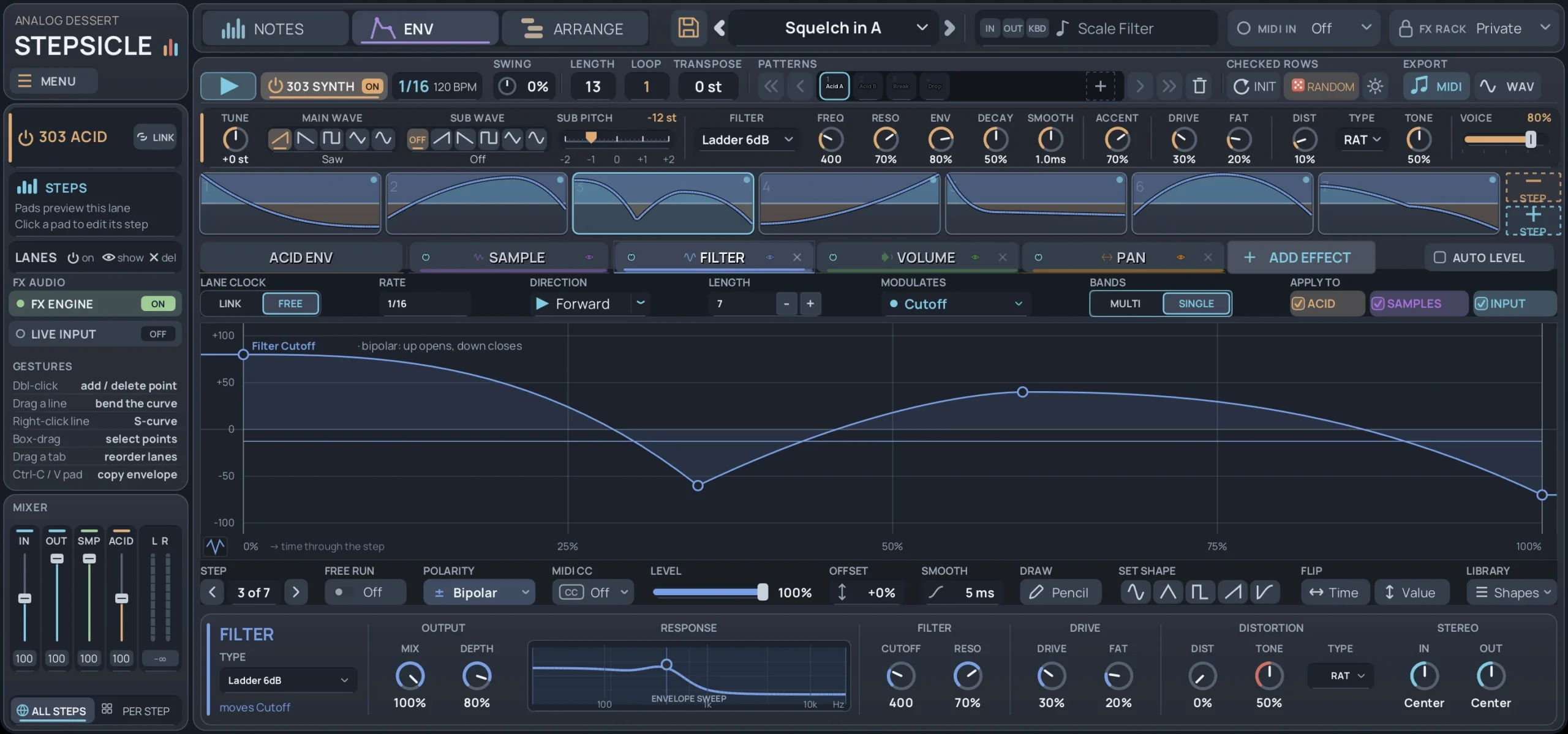
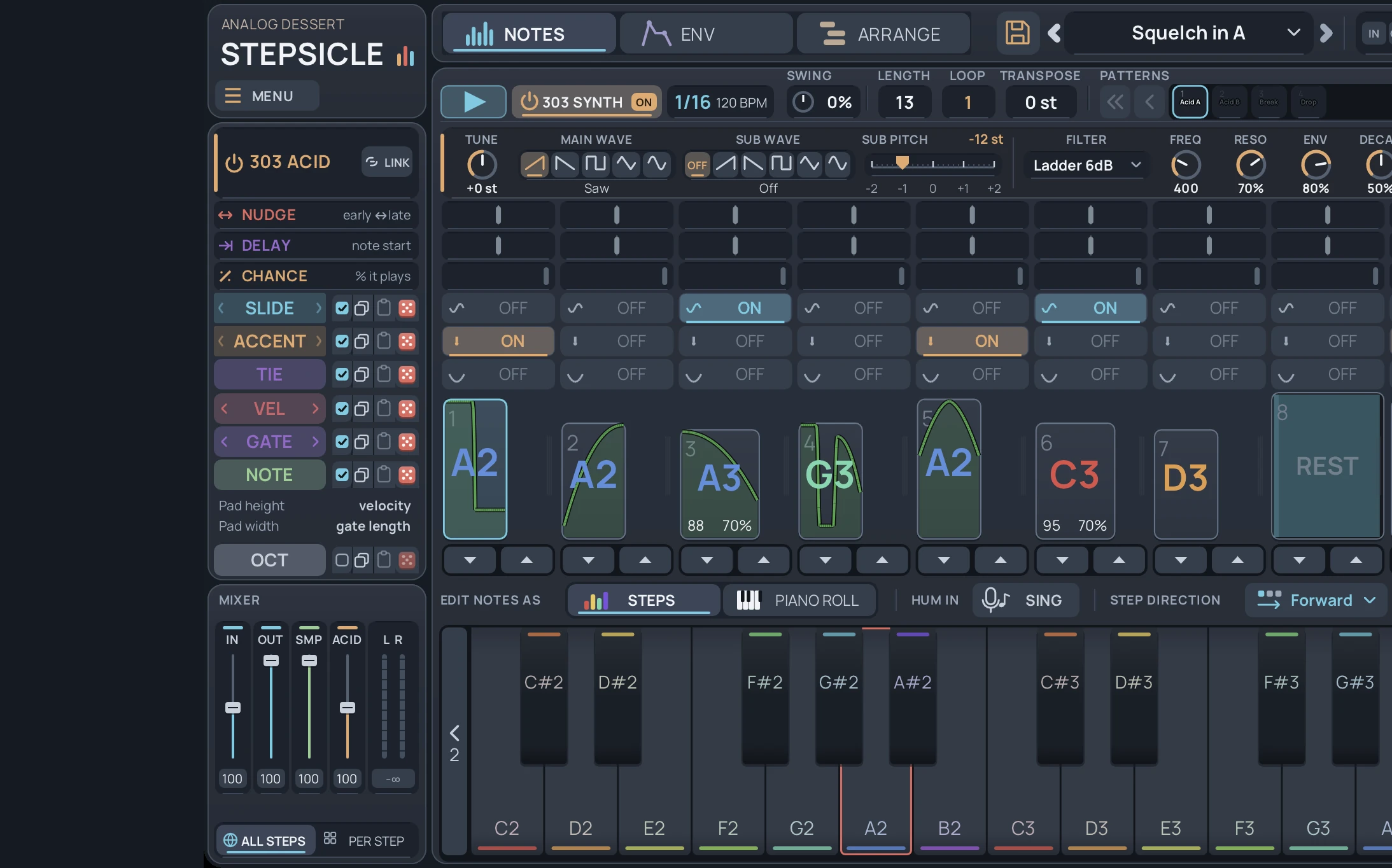
Stepsicle step sequencer plugin with the 303 synth on and a 13-step acid pattern

Stepsicle

An envelope machine for audio, MIDI and control voltage.

It can be one of these, or all of them at once:

  • A 303-style acid synth.
  • A 303-style step sequencer.
  • An effects engine where each step has its own effect and envelope. It is like a separate LFO or shaper plugin on every step.
  • A MIDI-to-CV converter for external gear.
  • A CV shaper and modulator for external gear.

Every step can have its own envelope, shape, effects and overrides. Each lane runs its own step count and clock, so one pattern can be polyrhythmic and polytempo.

No other plugin does all of this. It is like 20 plugins in one.

$49.00

One license covers 2 computers

Tap to hear raw sound output from Stepsicle

  • VST3 and standalone app
  • Windows and macOS, 64-bit

How it differs

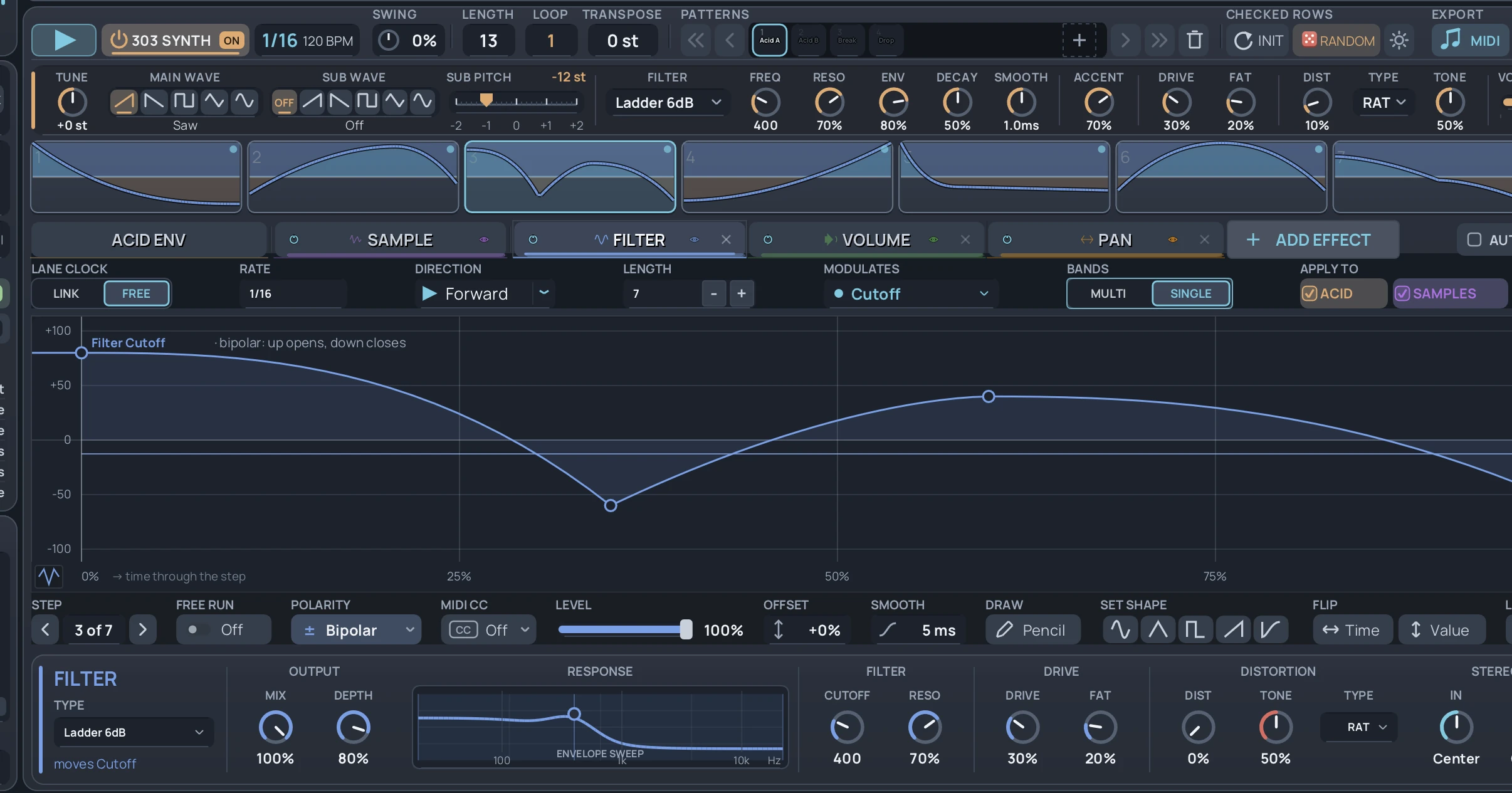
13 note steps above a 7-step filter lane, with a different curve on each filter step

Every lane keeps its own count

Think of a separate ShaperBox or LFOTool on every step. Each lane also runs its own step count and clock.

  • Notes: 13 steps. Filter: 7. Volume: 5. Pan: 3, at half speed.
  • Each lane starts over at a different moment, so every bar sounds a little different.
  • All four only line up again after more than 170 bars, from one short pattern.
  • Each lane can drive the 303 synth, an audio effect, MIDI CC or CV.

See it

Control your external gear in time. Each step has its own curve, sent out as control voltage. Here it moves the filter cutoff of an ARP 2600 from the VST, synced to the DAW tempo.

One pattern, three jobs

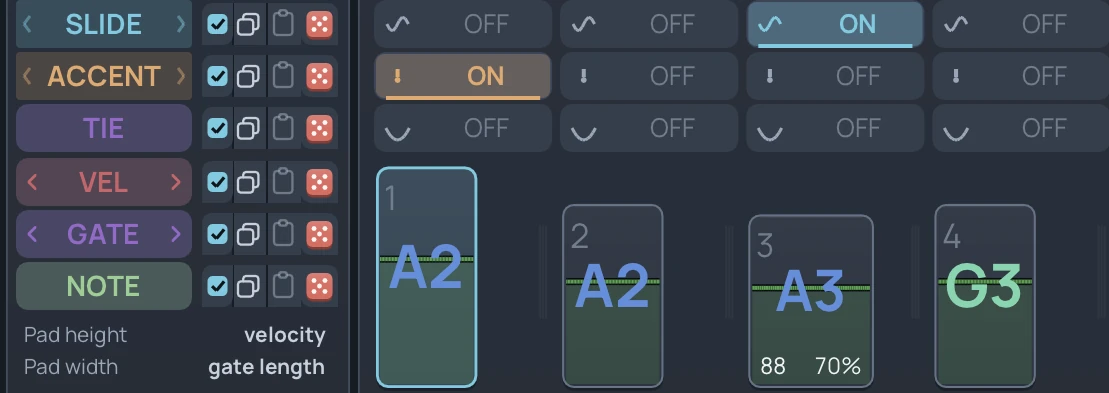
  • Slide, accent and tie rows above the first four steps of an acid pattern

    True 303 sequencing

    No 303 clone would send plain MIDI out, so I built one that does. The acid voice came later.

    • Slide, accent and tie work the way a 303 plays them.
    • Slides overlap notes, so the synth glides.
    • Accents send velocity 110.
    • Drive a TD-3, any MIDI synth or the Acid Synth.
  • Distortion lane with a different curve on each step

    A curve on every step

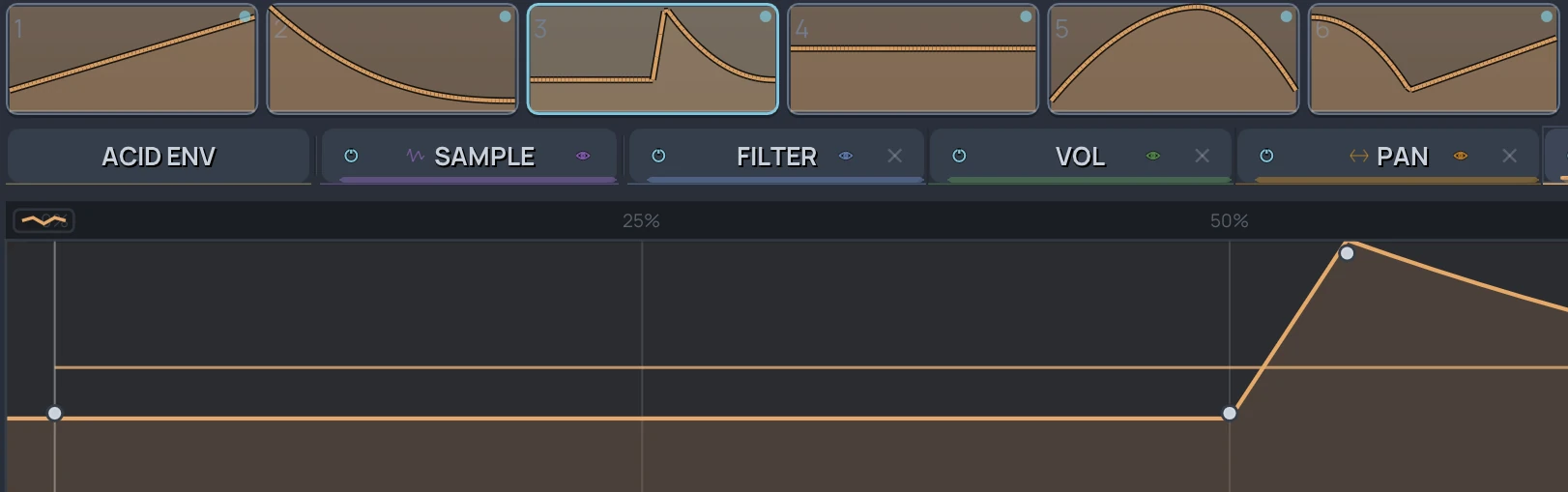
    Draw a different envelope curve on every step.

    • Run several envelope slots, each on its own clock.
    • Start from 24 built-in shapes or save your own.
    • Send the same curves out as MIDI CC.
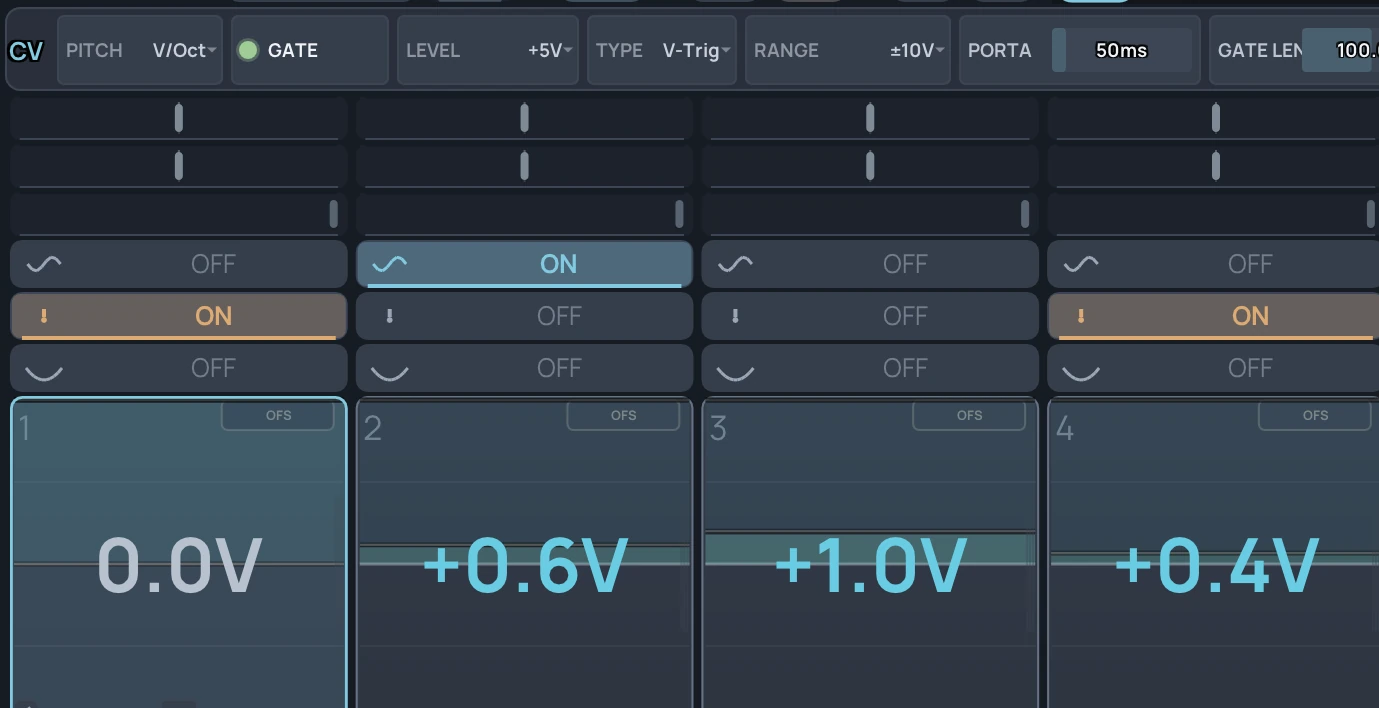
  • Four CV steps with pitch voltages, below the V/Oct pitch, +5V gate, V-Trig and ±10V range settings

    Calibrated CV

    Play analog and modular gear straight from the pattern.

    • Pitch, gate and envelope voltages.
    • VCO auto-calibration keeps oscillators in tune.
    • 1V/oct, linear and Hz/V pitch.
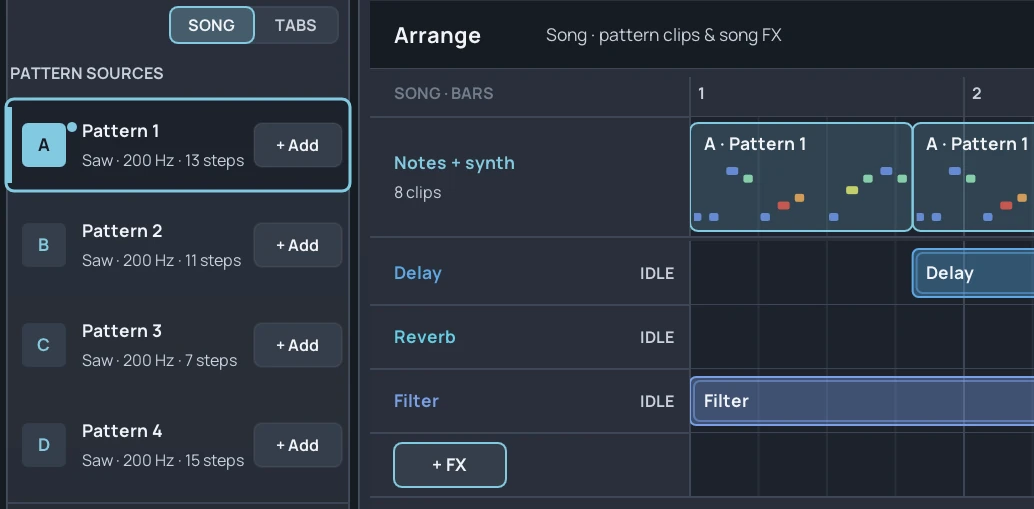
  • ARRANGE view with patterns laid out as a song, and delay, reverb and filter regions below

    Patterns and chains

    Chain patterns into full arrangements.

    • Each pattern keeps its own length, rate and direction.
    • Play forward, reverse, pendulum or random.
    • A scale filter keeps notes in key.
    • Lay patterns out as a song in the ARRANGE view (SONG in Stepsicle MIDI). In the effects version, paint delay, reverb or filter over parts of the song.

A closer look

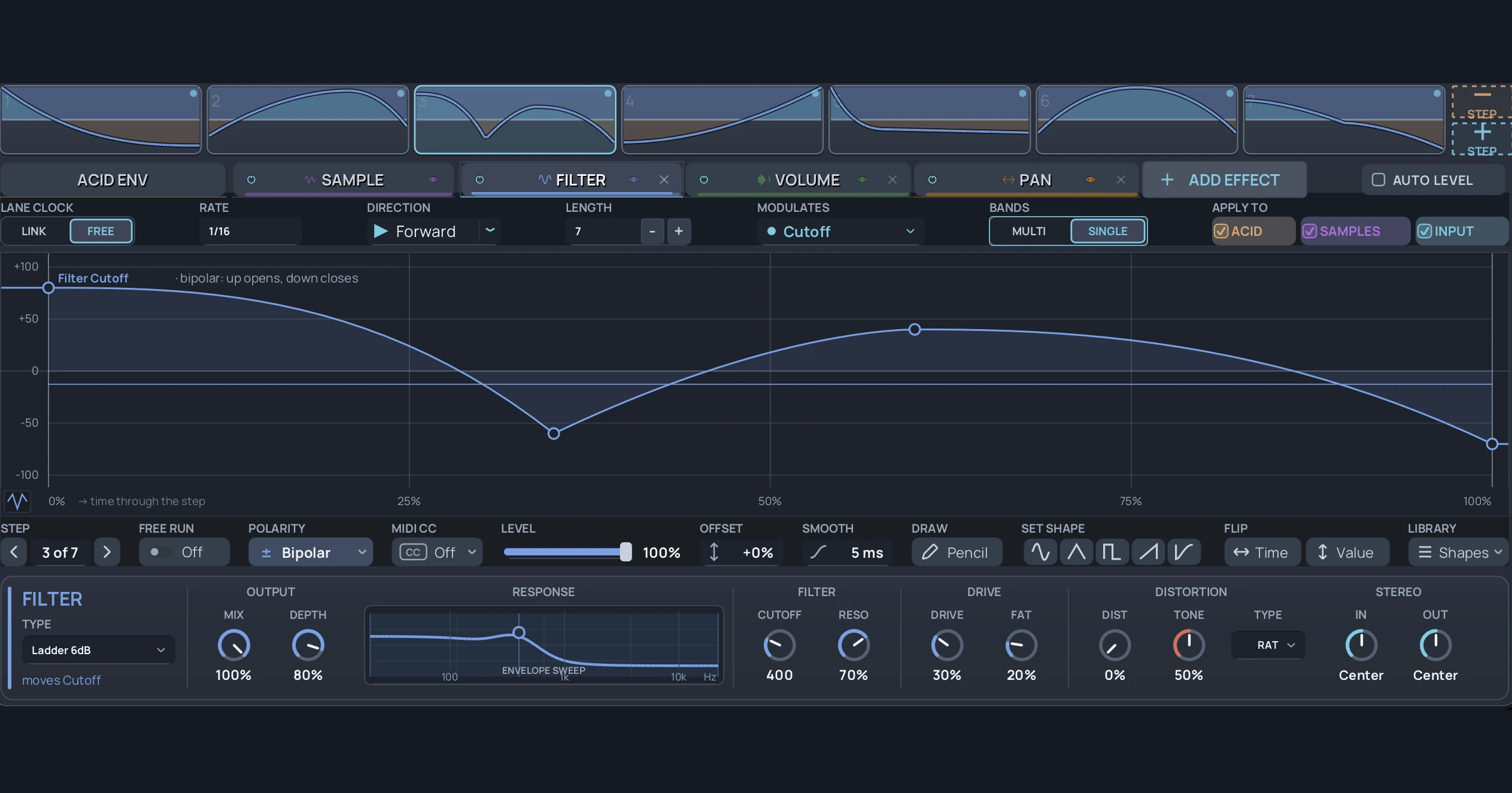
Filter cutoff lane with seven steps, each with its own curve, above the filter controls

Envelope shaper and effects

Every step carries its own envelope curve, so a filter or volume can move differently on each note.

  • 15 filter types: ladder, diode and state-variable.
  • Drive stages around the filter, with up to 8x oversampling.
  • Choose from 15 insert effects, including delay, reverb, distortion, bitcrusher, stutter and tape stop. Drag them into any order.
  • Set an effect to per-step control and it follows the selected step.
  • Each effect lane can have its own step count and a different shape on every step. A 7-step filter against a 13-step pattern gives you a polyrhythm.
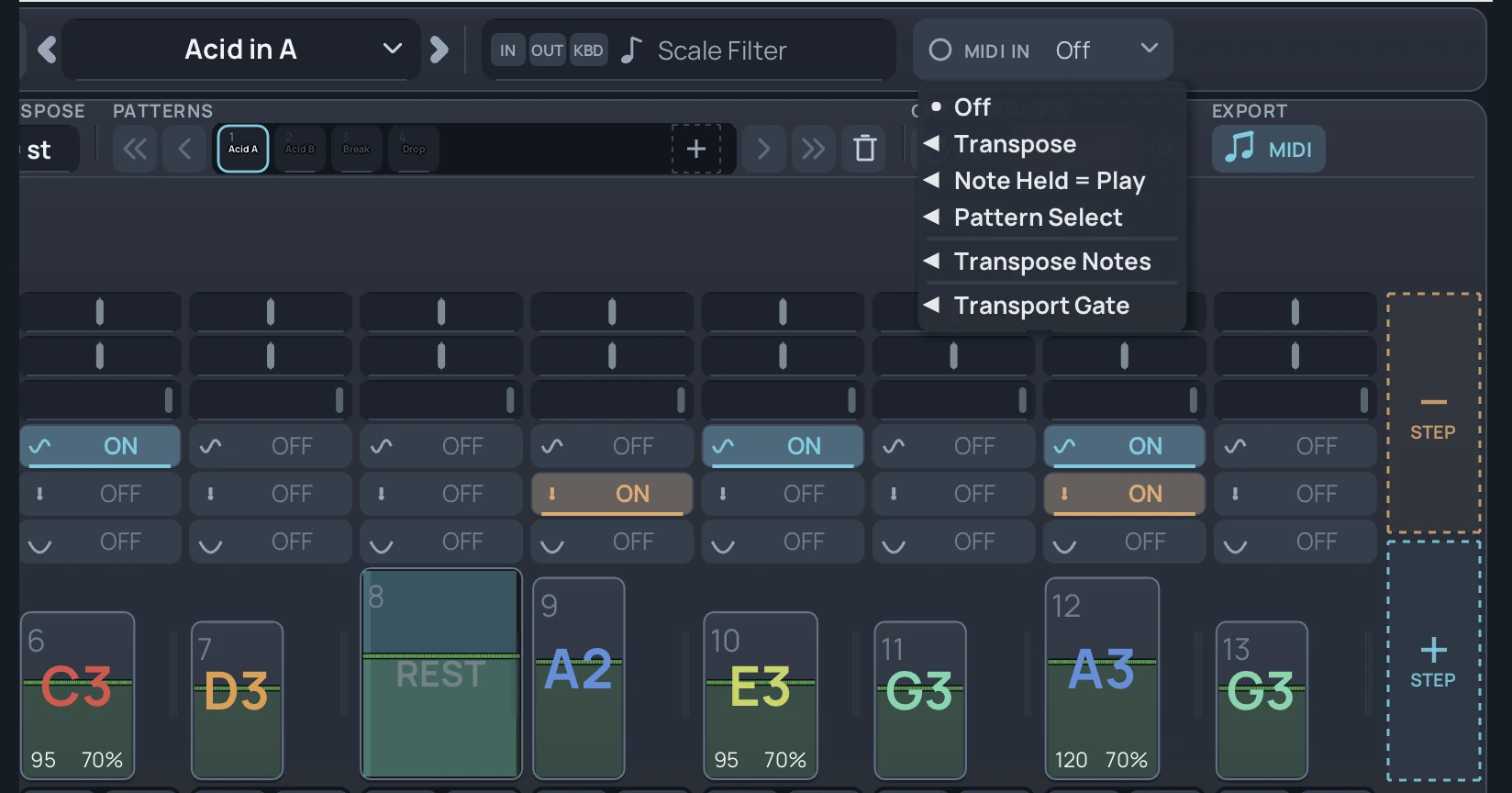
MIDI IN menu with Transpose, Note Held = Play, Pattern Select, Transpose Notes and Transport Gate

Performance and MIDI export

Play the sequence live, then drag it into your DAW.

  • MIDI input modes: Transpose, Note Held = Play and Pattern Select.
  • Transport Gate starts and stops the sequencer from one MIDI note.
  • Live Record captures notes and velocity.
  • Undo history is saved with the project.
  • Drag a pattern, or Shift-drag the full chain, into the DAW as a MIDI file.

API and MCP control

Stepsicle has a built-in API and MCP server, so scripts and compatible AI assistants can build and change patterns with you.

Ask in plain language, for example:

  • "Write an acid line in A minor with slides on the offbeats."
  • "Accent steps 5 and 6."
  • "Draw a filter curve that opens across the bar."

Every change lands in the pattern, so you can keep editing by hand.

Stepsicle is a step sequencer plugin and standalone app: one 16-step instrument for sequencing MIDI, shaping audio, and controlling analog hardware with calibrated CV. The same patterns move between all three workflows:

  • Program true 303 slide, accent, and tie.
  • Draw a different modulation curve on every step.
  • Send pitch, gate, and envelope voltages through a DC-coupled interface.

Each step stores note, velocity, gate length, slide, accent, rest, skip, tie, octave, nudge, note delay, and trigger probability. Build precise acid lines, evolving effects, polyrhythms, and playable arrangements without spreading the work across several plugins.

303 & MIDI sequencing

A 303 line depends on how notes connect. Stepsicle drives a TD-3, a TB-303 MIDI setup, any hardware synth, or any soft synth that responds to velocity and overlapping notes.

  • Slide: overlapping notes trigger the destination’s own portamento behavior.
  • Accent: velocity 110 crosses the TD-3/TB-303 accent threshold while ordinary steps remain below it.
  • Tie: the previous note continues without a fresh attack.

Stepsicle is the sequencer rather than a fixed synth voice. One pattern can play the box on your desk, a software instrument, the built-in Acid Synth for quick monitoring, or a modular oscillator through CV.

Read more on the 303 MIDI sequencer page.

Patterns, chains & live performance

Build up to 128 patterns and chain them into arrangements. Every pattern keeps its own settings:

  • Length, and transpose up to 36 semitones in either direction.
  • Rate: thirty straight, triplet, and dotted divisions from 1/32 through 16 bars.
  • Forward, reverse, pendulum, or random playback.
  • A 17-mode scale filter keeps notes in key, with per-step bypass for chromatic movement.

MIDI input modes let you transpose from a keyboard, play only while a note is held, or select patterns from incoming notes.

  • A learned Transport Gate drops the sequence in and out.
  • Live Record captures notes and velocity.
  • The 1000-step undo history is stored with the project.

Envelope shaper & effects

Instead of looping one LFO shape, Stepsicle lets every step carry its own breakpoint curve. Run up to 16 envelope slots per pattern. Each slot can:

  • Follow the sequencer.
  • Use one of 30 synced divisions.
  • Free-run in hertz, or use its own BPM.

Linear, exponential, logarithmic, and S-curve segments can start from 24 built-in shapes or a saved custom shape.

Fifteen zero-delay-feedback filters include ladder, diode, and state-variable low-pass, high-pass, band-pass, and notch designs. Drive, low-end fatness, RAT, Tube, Hard Clip, and Fuzz stages can sit around the filter with up to 8x oversampling.

The effects chain holds 15 insert effects, including delay, reverb, distortion, phaser, chorus, bitcrusher, stutter, tape stop and stereo width. Drag them into any order and run up to 8 of each per pattern.

  • Switch an effect to per-step control and its settings follow the selected step.
  • Envelope slots can also send MIDI CC, so the same shapes can animate external instruments.

Read more on the envelope shaper page.
Stepsicle envelope mode with a different curve on each filter step
Each envelope slot can draw a different breakpoint curve on every step.

CV, Eurorack & VCO calibration

Analog oscillators and audio interfaces do not track voltage perfectly. Stepsicle sweeps the connected oscillator, measures the returned pitch with two detection methods, and builds a 128-point correction table for that instrument. Save profiles per synth or store the calibration with the DAW project.

Route up to 18 CV outputs: pitch, gate, and up to 16 envelope voltages.

  • Pitch: 1V/oct, linear, and Hz/V.
  • Voltage ranges: ±5V, ±10V, 0 to 5V, and 0 to 10V.
  • Settings: portamento, gate level, V-trig or S-trig, accent boost, DC offset, and whether rests output zero or hold the previous voltage.

CV requires a DC-coupled interface. Expert Sleepers ES-series hardware and compatible MOTU, RME, and Antelope outputs are suitable; AC-coupled consumer outputs cannot hold the required voltage. In CV mode, connect those outputs only to synth or modular CV inputs, not mixers, monitors, or headphones.

Read more on the CV sequencer plugin page.

MIDI export, MCP & workflow

Drag the current pattern into the DAW as a Standard MIDI File at 480 PPQ, or Shift-drag the complete chain. Swing, nudge, and note delay are baked into the exported notes.

The built-in API and MCP server expose patterns, steps, envelopes, routing, and generation tools to scripts and compatible assistants. Use them to build or transform patterns, apply rhythm and groove ideas, and automate repeatable setup without replacing hands-on editing.

Comparisons

  • Acid synth plugins provide their own oscillator and filter character; Stepsicle concentrates on sequencing and can drive those instruments or external hardware.
  • Envelope tools repeat one curve, while Stepsicle can draw a different curve on every step across up to 16 independently clocked slots.
  • MIDI-to-CV tools translate notes, while Stepsicle adds sequencer-aware slide, accent, tie, per-step envelope voltages, and VCO auto-calibration.

The practical difference is consolidation: one pattern format can move from a MIDI synth to an audio-effects chain or a calibrated modular patch without buying or learning separate Stepsicle tiers.

Specs and requirements

At a glance
Formats
VST3 and standalone
Platforms
Windows and macOS, 64-bit
Sequencer
1 to 16 steps per pattern, up to 128 patterns, arranged as a song
Envelopes
a different curve on every step; each slot on its own clock
Filters
15 ladder, diode and state-variable types
Effects
15 insert effects plus filter, volume and pan, up to 8 of each per pattern
CV
pitch, gate and envelope outputs with VCO auto-calibration
MIDI export
Standard MIDI File, 480 PPQ; pattern or complete chain
License
one Stepsicle Full license includes MIDI, effects and CV
Requirements

Windows or macOS (64-bit)

  • A VST3 host, or run the standalone app

For CV

  • A DC-coupled audio interface, such as Expert Sleepers ES-series hardware or compatible MOTU, RME and Antelope outputs
Links

Questions

What DAWs does Stepsicle work with?

Stepsicle works as a VST3 plugin in 64-bit Windows and macOS hosts, including Ableton Live, FL Studio, REAPER, Bitwig, Cubase, and Studio One. It also runs as a standalone application.

Do I need a TD-3 or 303?

No. Stepsicle can sequence any MIDI hardware or software instrument. The slide, accent, and tie controls are especially useful with 303-style destinations, and the built-in Acid Synth can monitor a pattern without external routing.

What does the license include?

One Stepsicle Full license includes:

Do I need a special interface for CV?

Yes. Pitch, gate, and envelope voltages require a DC-coupled audio interface. MIDI and audio-effects use do not require one.

Pricing

Stepsicle Full

  • VST3
  • Mac 10.14+
  • Windows
$49.00

One license includes MIDI, effects, and CV.

One license covers 2 computers

More from Analog Dessert